
TL;DR

Get health and wellness essentials delivered free with Prime
- Fast, free delivery on millions of items
- Prime Video, Amazon Music and more included
- Member-only deals all year
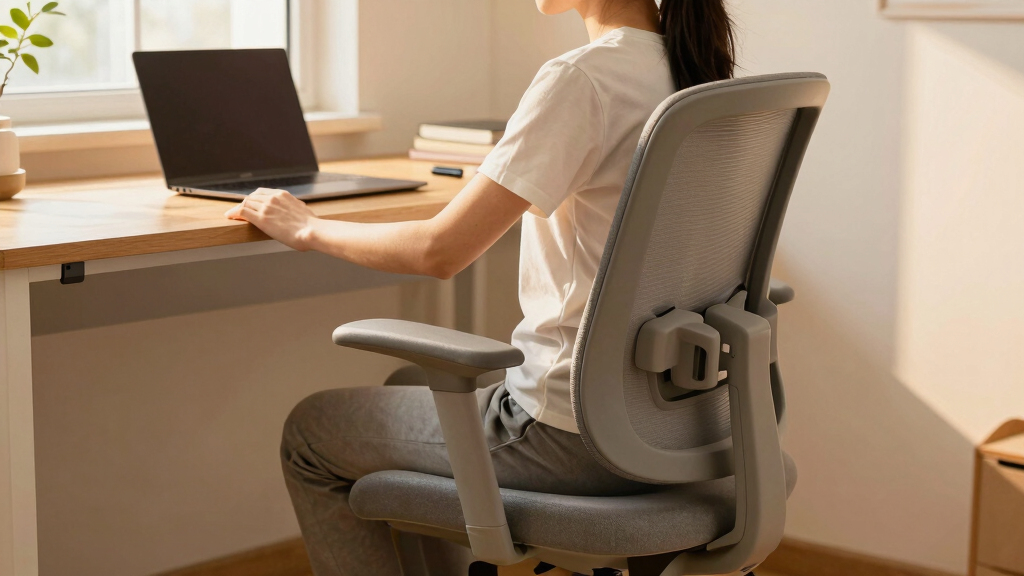
An ergonomic desk chair for students offers adjustable support to promote good posture and reduce discomfort. Prioritizing features like lumbar support, adjustability, and breathability makes a big difference. Proper setup and regular breaks are key to staying comfortable and healthy during long study sessions.
Imagine sitting at your desk for hours, your back aching, your neck stiffening. You know it’s not just bad luck—your chair might be the culprit. For students, especially with long study marathons, a good ergonomic chair isn’t a luxury; it’s a necessity.
This guide will show you what to look for, recent innovations, and practical tips to pick the perfect seat. Because when your posture supports your focus, studying becomes a lot easier and healthier.
Prioritize adjustable features like seat height, lumbar support, and tilt for a personalized fit.
Choose breathable fabrics and supportive padding to stay comfortable during long study sessions.
Invest in a quality ergonomic chair to prevent future back pain and improve focus.
Set your chair and monitor at the correct heights, and take regular breaks every 30-60 minutes.
Recent chairs incorporate smart tech and eco-friendly materials, making them smarter and greener choices.
What Features Make a Desk Chair Truly Ergonomic for Students?
An ergonomic desk chair for students must do more than just look good. It should cradle your body in a way that promotes natural alignment and encourages movement. This is crucial because static postures, especially during long study sessions, can lead to muscle strain, joint pain, and fatigue. A chair that supports natural spinal curves and allows movement reduces these risks, helping maintain comfort and focus over extended periods.
Think of it like a well-fitted glove—adjustability is key. A seat that can be raised or lowered, a backrest that tilts, and lumbar support that adapts to your lower back make all the difference. These features help maintain proper spinal curvature, which is essential for preventing long-term posture issues. Without proper support, students risk developing slouching habits that can lead to chronic back pain or neck strain. Moreover, adjustable features allow students to customize their setup based on their body size, desk height, and activity, ensuring consistent ergonomic benefits.
Other essentials include breathable mesh fabric that keeps you cool and a sturdy, smooth-rolling base to glide across your room or library. It’s about creating a setup that molds to you, not the other way around. Investing in these features means you’re prioritizing your health and comfort, which directly impacts your focus and energy levels during study sessions. Remember, a well-designed ergonomic chair doesn’t just improve comfort—it can prevent future health issues and improve your overall study efficiency.
As an affiliate, we earn on qualifying purchases.
How to Pick a Student Chair That Supports Your Posture
Follow these 4 simple steps to set up your perfect ergonomic chair:
- Adjust the seat height so your feet rest flat on the floor, with knees at a 90-degree angle. This position ensures proper blood flow, prevents pressure buildup in your lower back, and reduces fatigue during prolonged sitting. If your feet don’t reach the ground, using a footrest can help maintain this ideal posture, which is critical for spinal health.
- Position the backrest to support the curve of your lower back. Use lumbar support if available, but also ensure your back naturally aligns with the chair’s support—poor support can lead to slouching and strain over time. Proper lumbar support maintains the natural inward curve of your lumbar spine, reducing the risk of lumbar disc issues and muscle fatigue. The tradeoff here is between support and mobility—overly rigid lumbar support can restrict movement, so find a balance that encourages both support and flexibility.
- Set the armrests so your shoulders relax and elbows are at a 90-degree angle. Proper arm positioning reduces shoulder tension and prevents nerve compression, which can cause discomfort or numbness. Adjustable armrests allow you to match your desk height, avoiding awkward shoulder elevation or depression that can lead to strain. Be mindful that overly high or low armrests can cause discomfort over time, so fine-tune them for your body’s natural resting position.
- Ensure your monitor is at eye level to avoid craning your neck. This reduces strain on your neck and upper spine, which is crucial for long study periods. The tradeoff here is that improperly positioned monitors can cause neck tension, headaches, and even contribute to forward head posture. Using monitor risers or adjustable stands can help optimize your viewing angle, supporting your cervical spine and reducing fatigue.
For example, a student named Jamie found that raising her chair to align her eyes with her monitor and adjusting lumbar support helped her avoid back pain after hours of study. These adjustments might seem small but can significantly impact comfort and posture over time. Remember, the goal is to create a setup that minimizes strain and maximizes support, adapting as your needs change.
adjustable lumbar support office chair
As an affiliate, we earn on qualifying purchases.
As an affiliate, we earn on qualifying purchases.
Compare 3 Top Ergonomic Chairs for Students at a Glance
| Model | Price | Adjustability | Special Features | Best For |
|---|---|---|---|---|
| Hbada Ergonomic Office Chair | $150 | Seat height, tilt, lumbar support | Breathable mesh, compact design | Small spaces, dorm rooms |
| Flexispot Ergonomic Chair | $200 | Height, armrests, tilt, lumbar | Adjustable headrest, eco-friendly materials | Long study sessions, comfort |
| Autonomous ErgoChair 2 | $300 | Full adjustability, recline | Dynamic support, high durability | Health-conscious students |
When comparing these options, consider how each feature serves your specific needs. For example, adjustable lumbar support is critical for maintaining spinal health during prolonged sitting, while a breathable fabric can prevent overheating. The tradeoff often comes down to price versus customization; investing in a more adjustable chair may cost more upfront but can provide better long-term health benefits. Think about your typical study duration and environment to choose the best fit.
It’s also important to recognize that not all features are equally vital for every student. For instance, if you tend to study in warm environments, breathable fabric should be a priority. Conversely, if you spend long hours in front of a computer, full adjustability might be worth the extra investment. Weighing these tradeoffs helps you select a chair that balances your comfort, health needs, and budget effectively.
As an affiliate, we earn on qualifying purchases.
What’s New in Student Ergonomic Chairs? Better, Smarter, More Eco-Friendly
Recent models focus heavily on adjustability. Chairs now often feature synchronized tilt and lumbar support, making it easier to fine-tune your position. This synchronization ensures that when you recline, your lumbar support adjusts accordingly, maintaining spinal alignment and reducing strain. For students, this means less time fiddling with settings and more time studying comfortably. Some include smart sensors that alert you to change posture or remind you to stretch, which can help combat the tendency to remain static for hours. This integration of technology encourages healthier sitting habits by providing real-time feedback, reducing the risk of strain and fatigue.
Eco-conscious students will appreciate the rise of recyclable materials and sustainable fabrics. These options not only reduce environmental impact but also often come with durable designs that last longer, saving money over time. The tradeoff is that some eco-friendly materials might be less plush or slightly more expensive initially, but they typically offer better longevity and lower maintenance costs. Additionally, new space-saving designs cater perfectly to dorm rooms or shared apartments, where every inch counts. They help maximize limited space without sacrificing ergonomic benefits, often incorporating foldable or modular features for versatility.
Budget-friendly options that don’t skimp on ergonomic features are flooding the market, giving students more choices without breaking the bank. These include features like adjustable support and breathable fabrics that were once only available on premium models. The tradeoff here is that cheaper models might have fewer premium materials or slightly less durability, but they can still provide essential ergonomic benefits. It’s a shift toward smarter, greener, and more adaptable seating, making ergonomic health accessible to more students than ever before. The key is to evaluate which features provide the best value for your specific needs and how they impact long-term comfort and health.
As an affiliate, we earn on qualifying purchases.
Why Investing in a Good Chair Is Worth It for Students
Think of a good ergonomic chair as an investment in your health and focus. Poor posture can lead to back pain, neck strain, and even headaches—distractions that derail study sessions. Over time, these issues can develop into chronic problems that require medical attention, increasing costs and downtime. Investing in a quality chair today can prevent these issues from becoming serious, saving you money and discomfort in the future. The implications extend beyond immediate comfort—good posture supported by the right chair can improve your overall well-being and academic performance.
Research shows that discomfort reduces concentration and productivity. A chair that supports your body well helps you stay alert and engaged longer, which means more effective study sessions. Moreover, a high-quality chair distributes pressure evenly and supports natural spinal curves, reducing the strain on muscles and joints. This prevents fatigue and helps maintain mental clarity. The tradeoff is that higher-quality chairs often come with a higher initial cost, but the long-term benefits—less pain, fewer health issues, and better focus—make them a worthwhile investment for students serious about their health and academic success.
Imagine sitting comfortably through a two-hour study session, instead of shifting constantly or feeling stiff. The quality of your chair directly impacts your learning experience and overall well-being. While the initial cost might seem high, the long-term health benefits and improved focus make it a worthwhile investment. Over time, the reduced risk of musculoskeletal problems and increased comfort can translate into better grades and less time lost to health issues, reinforcing the value of choosing a well-designed ergonomic chair.
How to Set Up Your Ergonomic Chair for Maximum Comfort
Start by adjusting your chair height so your feet are flat and knees are at a 90-degree angle. This position promotes optimal blood flow and reduces pressure on your lower back. Then, position the backrest to support your lower back’s natural curve. If your chair has lumbar support, tweak it until it feels snug but not tight; proper lumbar support helps maintain spinal alignment and prevents slouching.
Next, set the armrests so your shoulders relax, elbows are at a 90-degree angle, and wrists are straight. Proper arm positioning reduces shoulder tension and nerve compression, which can cause discomfort or numbness over time. Adjusting armrests to match desk height prevents awkward shoulder elevation or depression. Finally, ensure your monitor is at eye level—this reduces the tendency to crane your neck, preventing upper spine strain and headaches. Using monitor risers or adjustable stands can help optimize your viewing angle, supporting your cervical spine and reducing fatigue.
For example, a student who adjusted her chair this way reported fewer headaches and less back pain after a week. These small but impactful adjustments can help you maintain good posture throughout long study sessions. Remember, ergonomics is about creating a balanced setup that minimizes strain and promotes comfort, which can be achieved with simple, thoughtful adjustments.
How Long Should Students Sit Before Taking a Break?
It’s simple: every 30-60 minutes, stand up, stretch, or walk around. Sitting too long—even in the best chair—can cause stiffness, reduce circulation, and lead to muscle fatigue. Regular movement helps keep your muscles active, prevents stiffness, and boosts blood flow to your brain, enhancing concentration. The implications are that consistent breaks not only prevent discomfort but also improve cognitive function, leading to more productive study sessions.
For example, set a timer or use a Pomodoro app to remind you. During breaks, do simple stretches: reach for the ceiling, touch your toes, or rotate your neck gently. These movements counteract the effects of prolonged sitting and help maintain flexibility. Incorporating these habits into your routine can significantly reduce the risk of developing musculoskeletal problems and mental fatigue, especially during long periods of study or work.
This habit is crucial for long-term health and sustained focus, especially during intense study periods. Regular breaks promote circulation, reduce muscle tension, and refresh your mind, making your study time more effective and comfortable. Developing this routine now can benefit your health well beyond your student years, supporting a lifetime of good posture and well-being.
Frequently Asked Questions
What features should I look for in an ergonomic desk chair for students?
Focus on adjustable seat height, lumbar support, breathable fabric, and smooth-rolling casters. These features help you customize your chair for maximum comfort and support.
Are ergonomic chairs worth the investment for students?
Absolutely. They can prevent long-term health issues like back pain and improve your focus, making study time more productive and less painful.
How do I adjust my chair for optimal ergonomics?
Set the seat height so feet are flat on the floor, support your lower back with the backrest, position armrests at desk height, and keep your monitor at eye level. Small adjustments make a big difference.
Can ergonomic chairs help with back pain?
Yes, when properly adjusted and used regularly, ergonomic chairs can significantly reduce or even prevent back pain caused by prolonged sitting.
What are some affordable ergonomic chairs suitable for students?
Brands like Hbada, Flexispot, and Autonomous offer budget-friendly options equipped with essential ergonomic features, making them accessible choices for students.
Conclusion
Don’t underestimate the power of a good chair. It’s not just furniture—it’s your secret weapon against discomfort and distraction. When your body feels supported, your mind can focus fully on the task at hand.
So, pick wisely, set up correctly, and remember to move. A healthier, more comfortable study life is within reach, one adjustable feature at a time.
Halloween Picks
halloween
As an affiliate, we earn on qualifying purchases.